Only you can read your notes.
Not us. Not anyone holding your device. Not anyone who breaks into our servers. Here's how — and how to check it yourself.
Your notes are encrypted on your device before they ever leave it, using a key made from your password that we never receive. On our servers, in your browser's storage, and everywhere in between, your notes exist only as unreadable code.
They become readable in exactly one place: on your screen, the moment you're reading them. They're never written to disk in the clear — not on our servers, not on your own machine.
That's why no one at VaultWeb can read your notes, no one holding your laptop can, and no one who breaks into our servers gets anything but noise. It isn't a promise we're asking you to trust. It's how the software is built — and you can watch it happen, in your own browser, in about thirty seconds.
See for yourself
You don't have to take our word for it. Open your browser's developer tools and watch:
- Open any note in VaultWeb.
- Open developer tools — press F12, or right-click and choose Inspect — and click the Network tab.
- Type a few words. Watch the save request go out. What leaves your browser is a block of ciphertext, not your words.
- Now open the Application tab and look at where VaultWeb caches notes for offline use (IndexedDB / local storage). Same thing there: unreadable blobs, not Markdown.
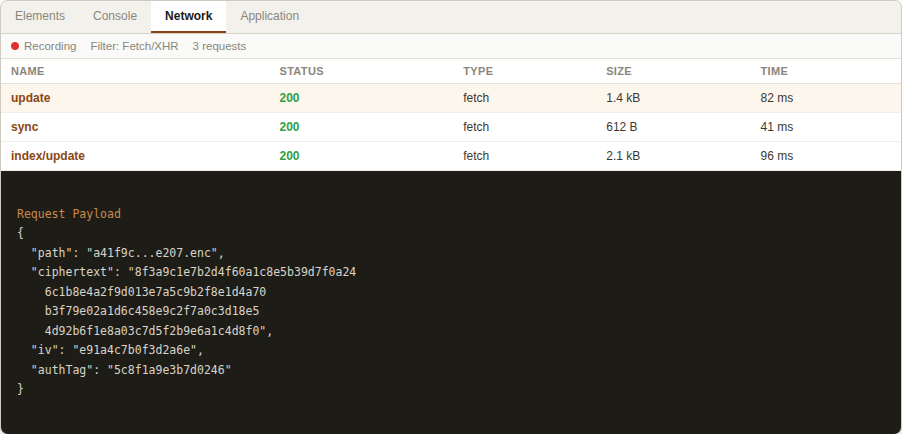
That's your notes leaving your device — and resting on it — as encrypted bytes. The only place they're ever readable is on the screen in front of you.
Even on your own device
Most encrypted apps protect your notes in transit and on their servers, then quietly keep a readable copy on your machine “for convenience.” We don't.
The cache on your device holds the very same encrypted bytes as our servers. Lose your laptop, hand it to a repair shop, sync it to a backup, get hit by malware — the files on disk are unreadable. They're decrypted only in memory, only while you're looking at them, and never written back to disk in the clear.
For someone who works on machines they don't fully control, that's the whole point.
How sharing works without us reading your notes
Sharing looks like it should break the promise: if only you can read your notes, how can you send one to someone else? The answer is that the keys travel where our servers can't follow.
Public links. When you create a public link, the note's decryption key is placed inside the link itself — in the part after the #, which browsers, by design, never send to any server. We store only the encrypted note and an encrypted title. Whoever opens the link decrypts it in their own browser, using the key in the link. We never see the key, the title, or the contents — even for a note you've deliberately made public.
Sharing with a person. Every VaultWeb account has its own key pair. When you share a note or a team vault with someone, your browser seals the note's key so that only their key can open it, then hands us the sealed result to pass along. We relay an envelope we can't open. Remove someone's access and the key is rotated, so an old copy is useless.
Either way, the rule never changes: our servers move sealed envelopes, and can't read what's inside.
What happens if you forget your password
Here's the honest tradeoff — and it's the clearest proof the encryption is real.
We can't reset your password, because we don't have your key. A company that can reset your password is a company that can read your data. We can do neither.
So when you sign up, VaultWeb gives you a one-time recovery key. Save it somewhere safe — a password manager, a printout, wherever you keep things that matter. If you ever forget your password, that key restores your access. It's the one way back in, and only you hold it.
No backdoor for us. No lockout for you — as long as you kept your key.
Technical details
For the cryptographically curious, here's exactly what happens.
- Content encryption. Every note is encrypted with AES-GCM-256, using a unique 96-bit initialization vector per write. The authentication tag is verified on every read, so tampering is detected, not silently accepted.
- Key derivation. Your password is stretched with PBKDF2-HMAC-SHA-256 at 310,000 iterations to derive a key-encryption key. That key is computed on your device and never leaves it.
- Vault key. A random AES-256 key encrypts your content. It's wrapped (AES-KW) under your password-derived key — and, separately, under your recovery key. Changing your password re-wraps this key; your notes themselves are never re-encrypted, moved, or exposed.
- Person-to-person sharing. Each account holds an ECDH P-256 identity key pair. The private key is itself encrypted under your vault key before it's ever stored on our servers. The public key is used to seal shared keys for you.
- Public shares. Each public link uses a per-share AES-256 key carried in the URL fragment and never transmitted to us.
On our servers we hold
Encrypted content, wrapped (sealed) keys, and public keys.
We never hold
Your password, your vault key, your recovery key, or anything readable.
What we can and can't see
We can see
Your email address, your billing and plan status, how much storage you're using, and when you sign in. We use these to run your account and keep the service healthy.
We can't see
Your notes or their contents, their titles, your tags, or even what you search for, who you share with, or anything else inside your vault.